
Getting Started
- Adding a new client account
- Adding another account user
- Age-based marketing redirects
- Changing a static background
- Connecting your Access Point with a PoE Power Injector
- Creating a UniFiOS admin user for external captive portal
- Custom domains and white labelling
- DOB Redirect - landing page based on visitors' age
- Downloading your invoices
- Enabling Fydelia Presence Analytics on Cisco Meraki
- Facebook Pixel For Fydelia
- Finding and editing your splash page
- Generating free voucher codes
- Getting started as a reseller
- Getting started with the portal
- Hotel WiFi Features
- How to add a background slider with zoom effect to your guest WiFi splash page
- How to change the redirect URL after successful login
- How to enable automatic email validation
- How to play a video Ad before guest WiFi users can sign on
- Instant provision of a new account
- iPhone QR scanning won't redirect to captive portal
- Key Announcement for UniFi API Users: MFA - Multi Factor Authentication with Ubiquiti UniFi in July 2024
- Logging in to your account
- Managing your clients with sub-accounts
- Managing your subscription
- Piggy integration with Fydelia WiFi
- Purchasing vouchers with WiFi Pass
- Real time analytics dashboard
- Reports
- Set VAT amount on your WiFi passes
- Simplifying Guest WiFi
- Starting a 14-day trial
- Stripe Key Settings
- Switching accounts in Reseller mode
- The UniFi controller interface versions
- Use your WiFi for COVID-19 Track & Trace
- Using free vouchers in your Fydelia splash page
- Walled Garden and Firewall IP settings
- What is WiFi marketing?
- WiFi Pass Overview
- Show Remaining Articles (26) Collapse Articles
- AdCards
- Age-based marketing redirects
- Custom domains and white labelling
- DOB Redirect - landing page based on visitors' age
- Facebook Pixel For Fydelia
- Hotel WiFi Features
- How to enable automatic email validation
- Purchasing vouchers with WiFi Pass
- Real time analytics dashboard
- Reports
- Test article
- Use your WiFi for COVID-19 Track & Trace
- WiFi Pass Overview
- Adding a certificate to a Fortigate Captive portal to prevent browser errors
- Age-based marketing redirects
- Changing a static background
- Connecting your Access Point with a PoE Power Injector
- Creating a UniFiOS admin user for external captive portal
- Enabling Fydelia Presence Analytics on Cisco Meraki
- Finding and editing your splash page
- Getting started with the portal
- How to add a background slider with zoom effect to your guest WiFi splash page
- How to add an Account user to your Account
- How to block a compromised Amazon Firestick
- How to change the redirect URL after successful login
- How to Download the Visitor Reports
- iPhone QR scanning won't redirect to captive portal
- Key Announcement for UniFi API Users: MFA - Multi Factor Authentication with Ubiquiti UniFi in July 2024
- Logging in to your account
- Piggy integration with Fydelia WiFi
- Reserved classes
- The UniFi controller interface versions
- Walled Garden and Firewall IP settings
- Show Remaining Articles (5) Collapse Articles
Hardware and Networks
- Accessing your Fydelia dashboard
- Applying an SSL Certiificate to your MikroTik HotSpot
- Aruba - built in controller
- Aruba InstantOn
- Cambium - Setup guide
- Cisco Meraki
- Cisco Mobility Express
- Configuring your UniFi controller to redirect guests to Fydelia splash pages
- Configuring your UniFi Splash page
- Connecting your UniFi Access Point
- Creating a FortiNet External Captive Portal
- Creating a Fydelia captive HotSpot portal on a MikroTik RouterBoard
- Creating a MikroTik Hotspot on a VLAN
- Creating a UniFiOS admin user for external captive portal
- Creating an EnGenius splash page
- Datto OpenMesh Setup Guide
- DrayTek Vigor 28xx
- Enabling an External Captive Portal with Ruckus ONE
- External Captive Portal with Alta Labs
- External Captive Portal with TPLink OMADA
- External Captive Portal with TPLink OMADA 5.15.x
- External Captive portal with Zyxel Nebula
- ExtremeCloud IQ / Aerohive
- Getting Fydelia connected to your network
- Grandstream external captive portal - Setup guide
- Guest Email validation with MikroTik
- Guest internet Voucher coupon generation on MikroTik
- Guest WiFi EnGenius Cloud setup
- How to redirect D-Link Nuclias guests to a Fydelia external captive portal
- IgniteNet ecCloud External Captive Portal setup
- Migrating UniFi APs to another controller
- Remote access to Mikrotik
- Ruckus - SmartZone Setup Guide
- Ruckus - ZoneDirector Setup Guide
- Ruckus Unleashed External Captive Portal setup
- Setting up voucher pages with Plasma Cloud
- SonicWall - Setup guide
- Step by Step : Connecting a UniFi Access Point
- UniFi "No Internet connection"
- UniFi Hotspot Manager
- UniFi issue with iPhones - won't redirect to the captive portal
- UniFi known issue: Problems connecting with Laptops
- UniFi Version 6 and earlier - captive portal setup
- UniFi Version 7.x captive portal setup
- UniFiOS captive portal splash page setup
- Walled Garden and Firewall IP settings
- What is PoE?
- Show Remaining Articles (32) Collapse Articles
- Accessing UDM Pro directly from the WAN
- Configuring your UniFi controller to redirect guests to Fydelia splash pages
- Configuring your UniFi Splash page
- Connecting your UniFi Access Point
- Creating a UniFiOS admin user for external captive portal
- Key Announcement for UniFi API Users: MFA - Multi Factor Authentication with Ubiquiti UniFi in July 2024
- Migrating UniFi APs to another controller
- Step by Step : Connecting a UniFi Access Point
- The UniFi controller interface versions
- UniFi "No Internet connection"
- UniFi Hotspot Manager
- UniFi issue with iPhones - won't redirect to the captive portal
- UniFi known issue: Problems connecting with Laptops
- UniFi Version 6 and earlier - captive portal setup
- UniFi Version 7.x captive portal setup
- UniFiOS captive portal splash page setup
- Show Remaining Articles (1) Collapse Articles
Integrations
- Build your DotMailer marketing database using WiFI
- Integrating with your TalkBox account
- Piggy integration with Fydelia WiFi
- Send customer WiFi data in real time to your MailChimp email marketing platform
- Send Guest WiFi data to your Campaign Monitor list
- Send guest WiFi data to your SproutSend marketing platform
- Toggle by Airship
- WiFi integration with Klaviyo CRM
- Zapier Integration Overview
- Build your DotMailer marketing database using WiFI
- Integrating with your TalkBox account
- Piggy integration with Fydelia WiFi
- Send customer WiFi data in real time to your MailChimp email marketing platform
- Send Guest WiFi data to your Campaign Monitor list
- Send Guest WiFi data to your Constant Contact lists
- Send guest WiFi data to your SproutSend marketing platform
- Toggle by Airship
- WiFi integration with Klaviyo CRM
- Zapier Integration Overview
IgniteNet ecCloud External Captive Portal setup
OVERVIEW
Setup is extremely simple with IgniteNet ecCloud. There are a couple of things to note:
1) Provision to the APs can take several minutes with ecCloud. You may not immediately see your changes
2) This document was created using the Spark Wave 2 AC1200, with firmware version 2.9.8-4594.
When testing with a lower firmware version 2.1.1-3354, testing was not successful, so we strongly recommend keeping up to date with firmware versions.
CREATING THE SSID
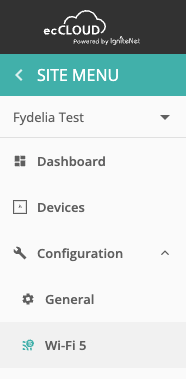
In the configuration menu click WiFi5:
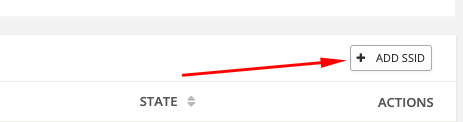
Click ADD SSID
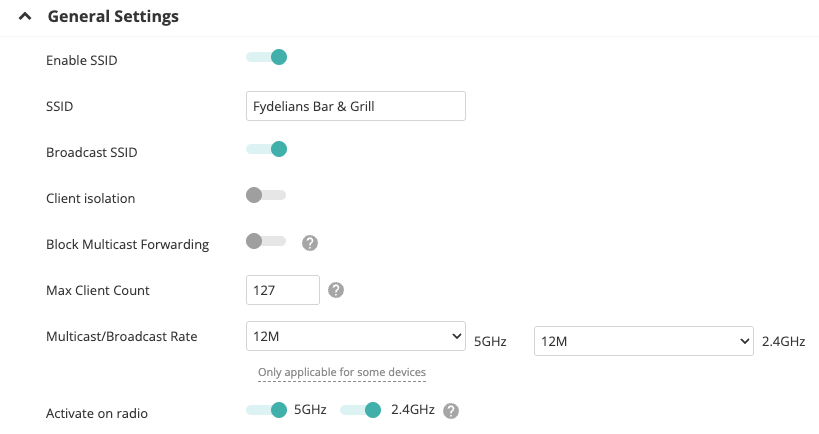
Give your SSID network a name:
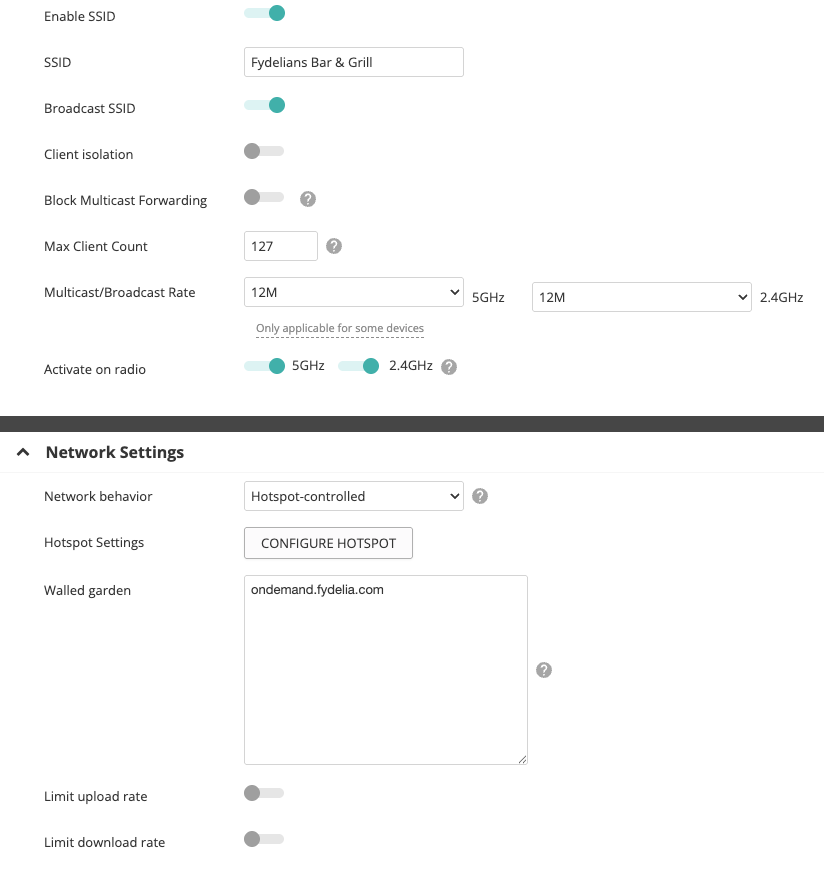
In the Network Settings area, choose: Hotspot-controlled, and in the walled garden add the fydelia ondemand domain:
In Security Settings ensure that the method is set to “Open”
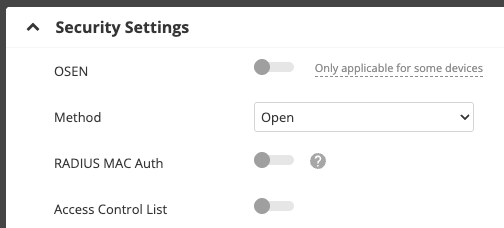
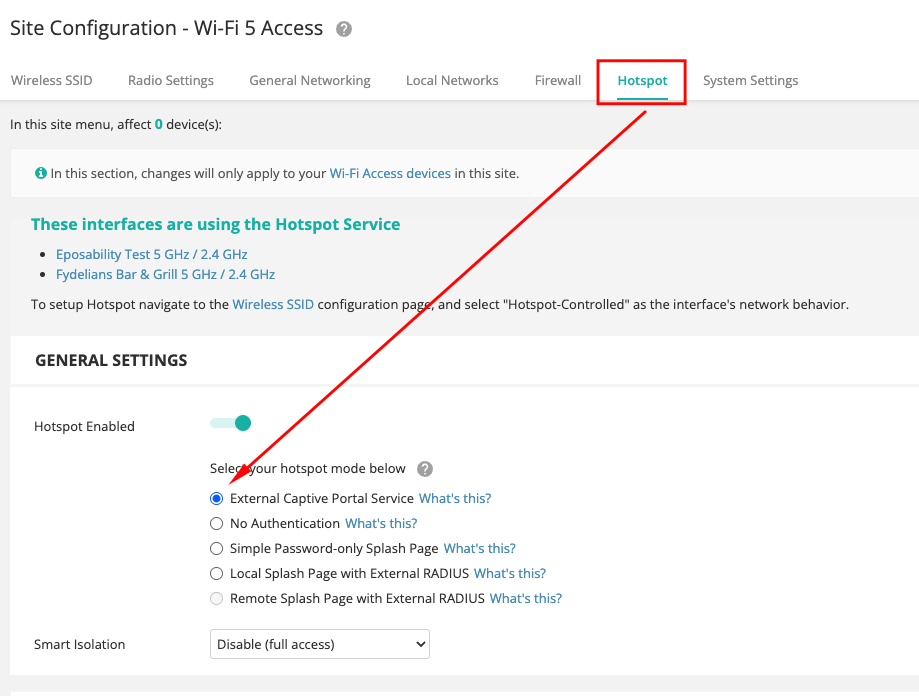
CONFIGURING THE HOTSPOT PORTAL
Under the Hotspot menu, select External Captive Portal Service
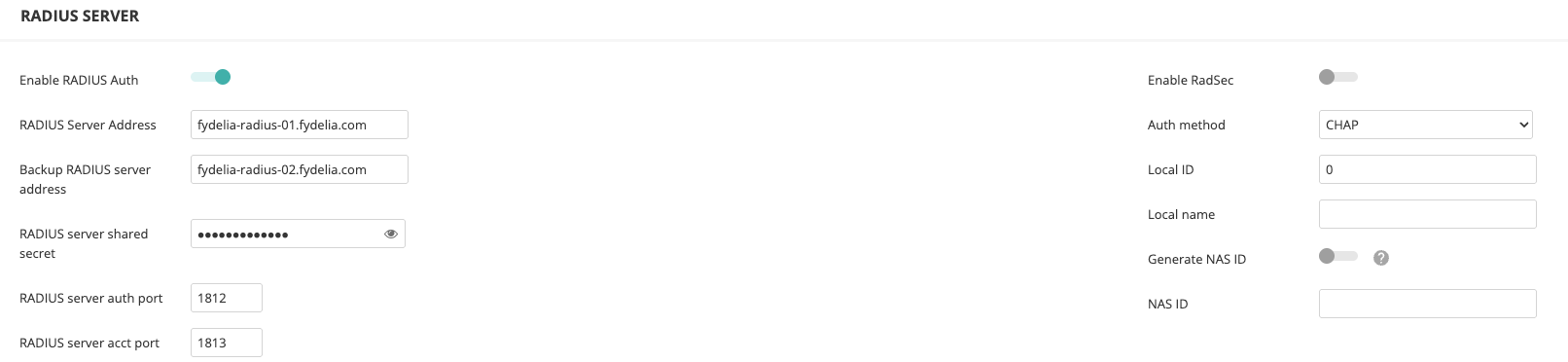
Under RADIUS SERVER enter the Fydelia radius details
The IP and Domains for RADIUS are available ON THIS PAGE
Here’s an example:
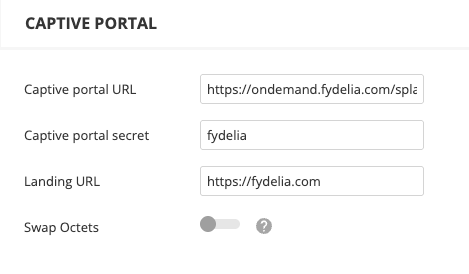
In the CAPTIVE PORTAL area enter the full Captive Portal URL, secret and Landing URL
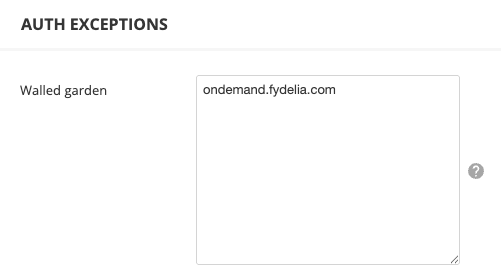
In AUTH EXCEPTIONS enter the required walled garden domains:
And that’s it, you’re all set!
